



3D CAD
Generative AI
Manufacturing DX
September 23, 2026
CATIA AI Features: What LEO and Generative Experiences Do, Availability on CATIA V5, and Pricing
 Updated on 2026/09/23
Index
Search for “CATIA AI” and you get virtual companions, Generative Experiences, Generative Design, Industrial AI. But what a design floor running CATIA wants to know is: what can my CATIA do today, and what does it cost?
This article organises CATIA’s AI features, limited to what we could confirm in Dassault Systemes’ own press releases, official blog and product pages. It does not rank CATIA against other CAD systems. It takes the single chapter we wrote in CAD AI Feature Comparison and goes deeper on CATIA alone. Every statement carries its source. It is based on information published as of September 2026, so check the primary sources and the latest release notes alongside it when you evaluate.
Key points of this article
- CATIA’s generative AI only became available in July 2026. The virtual companion LEO and Generative Experiences were rolled out in 3DEXPERIENCE CATIA (CATIA V6) R2026x FD03
- Both are delivered on the 3DEXPERIENCE platform SaaS (public cloud). We could find no official statement that they run on CATIA V5 or on-premise environments
- CATIA’s Generative Shape Design, Generative Drafting and Generative Design are not generative AI. The names are close enough that you have to read them apart
- LEO is designed so that every suggestion comes back for review and approval. The AI does not carry out the design on your behalf; a person approves it
- Pricing is consumption-based, through what Dassault Systemes calls Blue Tokens. List prices are published in the official store
Does CATIA have generative AI?
It does. But rather than “AI features were added to the product called CATIA”, the official announcements make more sense read in this order: the AI of the 3DEXPERIENCE platform as a whole reached CATIA too.
| Date | What happened | Source |
|---|---|---|
| 4 February 2025 | 3D UNIV+RSES announced, presenting three classes of AI service: Generative Experiences, Virtual Companions and Virtual Twin as a Service | Official press release |
| 11 February 2026 | Virtual companions AURA, LEO and MARIE formally announced. Aura already available; Leo and Marie to follow during 2026 | Official press release |
| 23 July 2026 | AURA, LEO and MARIE announced as available, with 19 competencies across the three | Official press release |
| 28 July 2026 | Virtual Companions and Generative Experiences rolled out in CATIA R2026x FD03 | Official CATIA blog |
The official blog writes: “Virtual Companions – AURA, LEO, and MARIE – are now globally available on the 3DEXPERIENCE platform SaaS”. That one word — SaaS — is the most important premise in this article, as we come back to below.
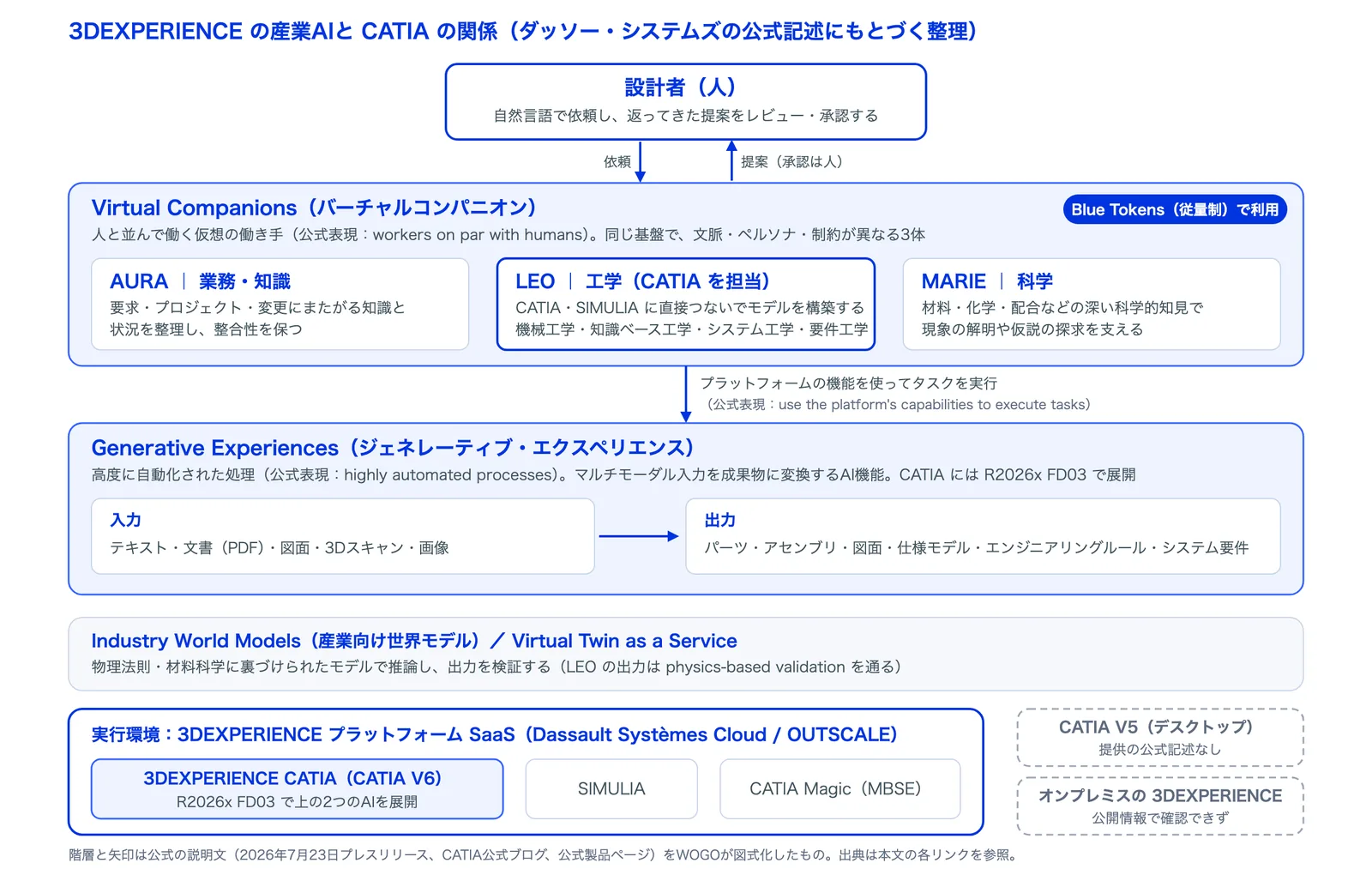
Put on a single page, the relationships look like the figure below. Virtual companions are workers that work in dialogue with people; Generative Experiences are automated processes that turn inputs into deliverables; both sit on Industry World Models and run on the 3DEXPERIENCE platform SaaS. In the 23 July announcement, Dassault Systemes CEO Pascal Daloz described the relationship as virtual companions as workers on par with humans, Generative Experiences as highly automated processes, and Virtual Twin as a Service as predefined industry world models.
Does “Generative” in CATIA mean generative AI?
Usually not. CATIA has long carried a number of features named “Generative”, and they are easy to confuse with generative AI.
| Name | What it does | Generative AI? |
|---|---|---|
| Generative Shape Design | A workbench for surface design | No |
| Generative Drafting | Generates associative drawings from 3D. The official product description cites drawing wizards and automatic dimensioning, with no mention of AI | No (rule-based) |
| Generative Design (topology optimisation) | Derives lightweight shapes from load conditions. The official blog describes it as powered by topology optimization, not as AI | No |
| Generative-Driven Design (R2026x) | Speeds up convergence of parametric optimisation (R2026x What’s New) | No |
| Virtual Companions (LEO and others) | AI agents that converse in natural language and operate on and verify models | Yes |
| Generative Experiences | AI features that generate deliverables from documents, images, scans and the like | Yes |
When people say “using generative AI in CATIA”, they mean the bottom two rows. Those are what we look at below.
What can the virtual companion LEO do?
Of the three, LEO is the one in charge of engineering. The official product page states “LEO is trained to use CATIA.”, and the FD03 blog positions it as a virtual teammate that interfaces directly with CATIA and SIMULIA tools to build models. Its specialisms are mechanical engineering, knowledge-based engineering, systems engineering and requirements engineering.
The official pages list its work in three broad groups.
- Understanding and navigating existing designs: understanding existing designs, grasping complex product structures, managing engineering knowledge, accelerating design changes (CATIA official blog, 10 August 2026)
- Generating assembly structures, running simulations, diagnosing model defects and resolving design errors (R2026x What’s New)
- Generating 3D models from 2D sketches, flagging violations of parameters, regulations and constraints, and verifying manufacturability (Virtual Companions page)
In terms of the three layers of what AI touches that we used in the previous article (layer 1: predicting operations, layer 2: searching knowledge, layer 3: generating and editing models), LEO spans both layer 2 and layer 3. Read it as equivalent to an AI assistant that stops at knowledge search and you will misjudge what it is.
The output is a suggestion; a person approves it
Here we quote the official wording directly. The product page says “Because every suggestion comes back to you for review and validation, you always stay in control.”, and the explanatory page states that “responsibility for how it is used remains with the human engineer”.
The live LEO demo at 3DEXPERIENCE World 2026 in February 2026 (on SOLIDWORKS xDesign) also showed sketches extracted from a PDF drawing, with the 3D model generated once the user approves (MONOist). It is not “the AI designs for you” but “the AI suggests and a person approves“. When you design the way it will be used, decide first who approves and against what criteria.
How LEO relates to AURA and MARIE
AURA, released at the same time, handles business and knowledge; MARIE handles science (materials and chemistry). Leo is described as supporting the resolution of advanced technical problems across engineering disciplines, from design to production. The three are not separate AIs: SOLIDWORKS CEO Manish Kumar has said they are the same intelligence with different context, persona and constraints (engineering.com). LEO answering only with manufacturable options is a matter of how those constraints are designed.
What does Generative Experiences automate?
The FD03 blog defines Generative Experiences as AI capabilities that convert multimodal inputs — text, documents, drawings, scan data — into actionable outputs such as deliverables, design updates and enrichment of the virtual twin. The inputs are documents, drawings and scans; the outputs are deliverables and model updates.
As added or extended in FD03, the official blog lists the following.
| Feature (official wording) | What it covers |
|---|---|
| Solid Features Creation | Creating solid features |
| Part Generation from multimodal inputs | Generating parts from multimodal inputs such as images and documents |
| Assembly Generation through predicted mechanical interfaces | Generating assemblies by predicting mechanical interfaces |
| Generative Engineering Rules | Generating engineering rules (we could not confirm the details in public sources) |
| Generative Systems Requirement creation | Generating system requirements |
| Generative Systems Architecture suggestions | Suggesting system architecture |
The CATIA industrial AI product page lists uses such as generating a structured specification model from a PDF, going from a 3D scan to a parametric model, going from a single image to a fully defined CATIA part, generating an assembly from mechanical interfaces, and generating drawings automatically. We could not confirm from the official blog which FD delivered automatic drawing generation.
Can CATIA V5 use the AI features?
Within what is published, we could find no statement that virtual companions or Generative Experiences run on CATIA V5.
The FD03 blog gives the delivery target as the 3DEXPERIENCE platform SaaS, and the Blue Tokens purchase conditions in the official store state “Your environment must be hosted on the Public Cloud”. Whether virtual companions can be used on an on-premise 3DEXPERIENCE could not be confirmed from information published as of September 2026.
Since both assume the cloud, it is reasonable to infer that CATIA V5, a desktop product, cannot use them. In practice, assume that using them presupposes running 3DEXPERIENCE CATIA (CATIA V6) in the cloud.
What do CATIA’s AI features cost?
Virtual companions are charged on a consumption basis through Blue Tokens. The official explanation describes Blue Tokens as behaving like credits, consumed each time a user interacts with a companion.
The official store (as of September 2026) states the following.
| Item | What the official store says |
|---|---|
| Pack | 25,000 Blue Tokens = USD 1,250 per year (US official store list price) |
| Validity | Unused tokens expire after 12 months. Renews annually |
| Consumption guide | Low: text questions, applying materials, structural checks. Medium: standard generation work on everyday parts. High: intensive generation on large assemblies or complex shapes |
| Purchase conditions | A legal entity registered in one of 25 countries (including Japan), with the environment hosted on the public cloud. Otherwise via a partner or sales |
Prices in yen, and prices through partners, are not published. Because consumption varies with the complexity of the task, you budget for it differently from a flat licence. Dassault Systemes said in its full-year 2025 results that it would introduce industrial AI offerings and a value-based charging model (results press release), and this consumption model is part of that.
Estimating the cost per task from official information
There is no official table of token counts per task, so we assemble a guide from the published figures and statements.
- Unit price: 25,000 tokens = USD 1,250, so 1 token = USD 0.05 (official store)
- When tokens are consumed: only when an AI skill produces a result; simply conversing does not consume them (SOLIDWORKS official)
- Scale: one pack covers “thousands of quick insights” or “dozens of complex generation tasks” (official store FAQ)
- A reported example: a question counting the parts in an assembly costs “5 to 10 cents”, i.e. 1 to 2 tokens. Drawing generation is undisclosed, rises with model complexity, and custom-trained inference costs more still (SOLIDWORKS CEO, engineering.com)
| Type of task (the three official bands) | Tokens, roughly | Per run, roughly | Basis for the estimate |
|---|---|---|---|
| Low: short questions, guidance, applying materials, structural checks | 1–2 | About USD 0.05–0.10 | The example reported by engineering.com (counting parts) |
| Low: quick insights generally | Several to a dozen or so | Tens of cents | Back-calculated from the official FAQ (“thousands per pack”) |
| Medium: standard generation on everyday parts (assembly performance analysis, parametrising imported parts, etc.) | No figure, official or reported | Between low and high | Positioned only as the middle of the three official bands |
| High: intensive generation on large assemblies or complex shapes | Several hundred to about 1,000 | Roughly USD 10–50 | Back-calculated from the official FAQ (“dozens per pack”) |
An annual example: one designer doing “low” 20 times a day (2 tokens) and “high” twice a week (500 tokens) comes to about 57,600 tokens over 240 days and 48 weeks, or about USD 2,880 — three packs. If “high” is daily, it is close to five times that.
SOLIDWORKS Design includes a free allowance of 2,000 tokens per licence (official blog); we could not confirm an equivalent for CATIA. All of the above is based on US list prices and excludes Japanese pricing and partner terms.
So how should a CATIA user approach AI?
The quickest route is to start not from “has AI been added to CATIA?” but from “is our CATIA within the scope of that AI?” There are three things to settle, in order.
- Product line and environment: V5 or 3DEXPERIENCE (V6)? If 3DEXPERIENCE, on-premise or SaaS? The official delivery target for virtual companions is SaaS
- Shape of the budget: Blue Tokens are consumption-based. Estimate the trial volume and the production volume separately
- How approval will work: LEO’s output is a suggestion and a person approves it. Decide in advance who approves and against what
And the first thing to settle is where rework is happening today. Without that, you cannot tell whether layer-2 AI or layer-3 AI is what would help. We have organised that structure in The Cost of Rework on the Manufacturing Design Floor, and the Case for 3D and 2D Design Verification. For how the AI features themselves are progressing, see How Generative AI Changes Design Work: A Timeline of Mechanical Design AI.
Frequently asked questions about CATIA’s AI features
How do AURA, LEO and MARIE differ?
By role. In the official announcements Aura handles business and knowledge, Leo engineering, and Marie science. The underlying AI is the same, with different context, persona and constraints, as the SOLIDWORKS CEO has explained.
Can LEO be used on CATIA V5?
Within what is published, we found no official statement of availability on V5. The V5 product pages make no mention of AI, and virtual companions are delivered on the 3DEXPERIENCE platform SaaS.
Can it be used on an on-premise 3DEXPERIENCE?
The official blog and store are written on the premise of SaaS and the public cloud, and availability on-premise could not be confirmed from information published as of September 2026. We recommend checking with your sales partner before adopting it.
Can a model generated by LEO go straight to manufacturing?
The official wording is “every suggestion comes back to you for review and validation”. Generation and verification come as a pair, and the approval step remains.
Summary
CATIA’s generative AI is the AI of the 3DEXPERIENCE platform, available since July 2026. The virtual companion LEO and Generative Experiences were rolled out to CATIA in R2026x FD03; delivery is on SaaS and charging is consumption-based through Blue Tokens.
The existing features named “Generative” are not generative AI, and there is no official statement of these AI features on CATIA V5. Start by checking which product line and which environment your own CATIA is on.
LEO’s output is a suggestion, and a person approves it. When you design the way it will be used, settle who approves and against what criteria first.
If you are interested in a mechanism that judges your own design standards automatically from the 3D model (What Is AI Drawing Inspection?), you are welcome to request our materials or contact us.
This article was written by WOGO Inc., a University of Tokyo-originated startup developing systems for design verification, automated drawing inspection and design/drafting automation in manufacturing using 3D, CAD and AI technologies.