



2D Drawings
3D CAD
Generative AI
Manufacturing DX
October 26, 2026
How to Choose and Compare AI Drawing Check Tools: 2D Drawing Checks vs 3D Model Checks
 Updated on 2026/10/26
Index
Search for “AI drawing check” or “drawing check software” to reduce your checking workload and you will find many products. But reading product introductions side by side, it is hard to tell which one suits your company.
One reason is that the same term, drawing check, is used for both tools that confirm a drawing is drawn correctly and tools that confirm the design itself is right. The former work on 2D drawings, the latter on 3D CAD models.
This article first sets out the difference between 2D drawing checks and 3D model checks. It then covers comparison points, such as how a tool uses AI and whether it can reliably catch mistakes, and introduces the main AI drawing check tools.
Key points
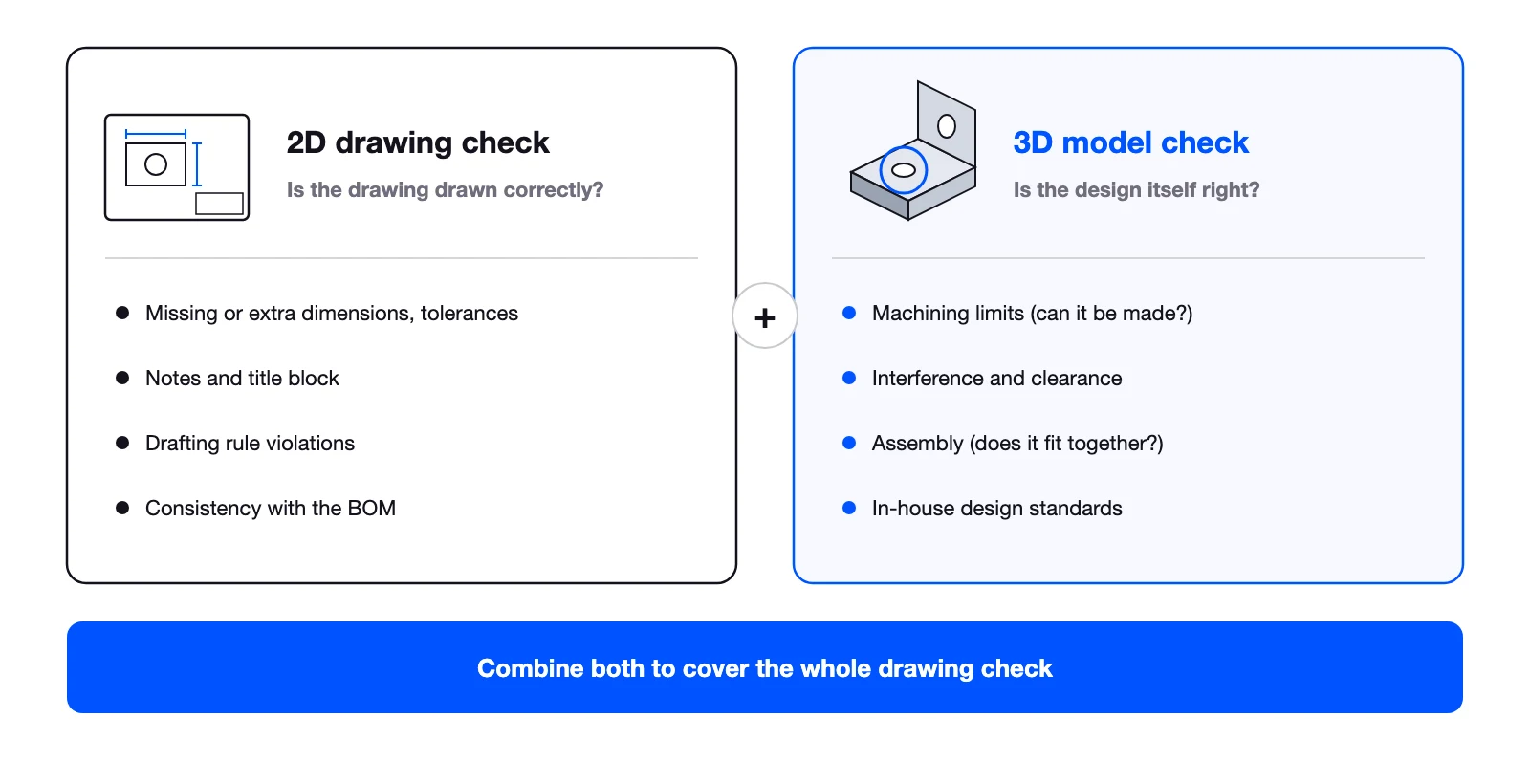
- AI drawing check tools split by what they check into 2D drawing checks and 3D model checks. 2D checks whether the drawing is drawn correctly; 3D checks whether the part is right as a part and whether the assembly fits together
- Because they look at different things, one alone is not enough. Both kinds of check are needed
- When comparing tools, check not only what they cover but also how they use AI and whether they reliably catch mistakes without missing any
- Most products listed in published comparison articles read 2D drawings or documents. Tools that analyze 3D geometry are easier to understand as a separate category
- WOGO’s Hacadly 3D Design Verification checks the correctness of the design, such as machining limits, interference and ease of assembly, from 3D CAD model geometry
AI drawing check tools split into two types by what they check
A drawing check has two meanings: checking the drawing and checking the design. AI drawing check tools also fall broadly into two groups depending on which they target.
| Aspect | 2D drawing check | 3D model check |
|---|---|---|
| Question | Is the drawing drawn correctly? | Is the design right (can the part be made, does the assembly fit together)? |
| Main target | 2D drawings (PDF, images, CAD drawing data) | 3D CAD models (parts and assemblies) |
| Main checks | Missing or extra dimensions and tolerances, notes and title block, drafting rules, consistency with the BOM | Machining limits, interference and clearance between parts, ease of assembly, in-house design standards |
| Hard to catch | Relationships between parts, whether a shape can be machined | Errors in dimensions, tolerances and notes that exist only on the drawing |
| Timing | Before release, once the 2D drawings exist | From the stage of designing in 3D CAD |
2D drawing checks: is the drawing drawn correctly?
A 2D drawing check reads the drawing and looks for missing or duplicated dimensions and tolerances, gaps in notes and the title block, and drafting rule violations. Instructions to manufacturing and procurement are still often given on 2D drawings, so correctness as a drawing is an essential check.
On the other hand, drawings are checked one sheet at a time. We hear that when work is centered on 2D drawings, you can only check what is on that sheet, and relationships such as tolerances between parts are hard to confirm. Judging whether a shape can be machined from the lines on a drawing is not easy either.
3D model checks: is the design right?
A 3D model check analyzes the 3D CAD geometry itself to confirm that a part can be machined and that the assembly fits together. Machining limits, such as the distance between a hole and a bend line, interference and clearance between parts, and ease of assembly, such as whether a tool can reach, can all be judged from 3D geometry.
CAD software has built-in interference checks, but many workplaces end up checking by eye because those checks also pick up purchased-part models and produce large numbers of false positives. 3D model check tools need to narrow results down to problems that matter for manufacturing, not just report whether interference exists.
Both checks are needed
2D and 3D checks cover each other’s weaknesses. Even if the 3D model is correct, missing dimensions on the drawing mean the shop floor does not get the right information. Conversely, even a cleanly drawn drawing leads to rework if the shape cannot be machined or the parts do not fit together.
When automating drawing checks, the realistic question is not “2D or 3D?” but how to combine 2D drawing checks and 3D model checks.
Points to compare when choosing an AI drawing check tool
Besides what a tool targets, there are two points worth checking when comparing tools.
How does it use AI?
Tools called “AI drawing check” use AI in many different ways. Some have generative AI (a large language model) read drawing images and make judgments; some use image recognition to read text and symbols on drawings and match them against rules; others analyze 3D geometry with geometric algorithms and use AI only as an aid.
Generative AI’s strength is reading drawings and documents that have no fixed format. On the other hand, its judgments are probabilistic, and the same drawing can give different results on each run. Which approach is best depends on the use, but which judgments use AI and which use rules is something to confirm before adopting a tool.
Does it reliably catch mistakes without missing any?
What matters in a drawing check tool is not how many findings it produces but that it misses nothing. People considering automation often tell us that “if a tool only checks halfway, people end up reviewing everything again anyway.” If people recheck what the tool already checked, the workload does not go down.
Points to confirm:
- Misses: does it check every item against the defined rules without omission?
- Repeatability: does the same data with the same rules always give the same result?
- Grounds for judgment: can it show the reason for a fail concretely, such as the measured value against the standard?
- False positives: does it avoid flagging purchased parts or intentional shapes in large numbers and adding to the checking work?
Being able to clearly separate what the tool reliably handles from what people should focus on is the condition for really reducing the drawing check workload.
Main AI drawing check and drawing check support tools
WOGO compiled this list as of October 2026 from information each company has published. The descriptions of features are each company’s own claims and have not been verified by WOGO. Delivery models and coverage may change, so check each company’s site for the latest information.
Tools that read and match 2D drawings and documents
| Tool (company) | Main target | Main checks (as published by the company) |
|---|---|---|
| KENZ (System Integrator) | Drawings and related documents such as specifications and BOMs | Missing dimensions, tolerances, consistency between the BOM and assembly drawing, consistency of names and drawing numbers across documents |
| Drawing-AI (Ficha) | 2D drawings (PDF, DXF, DWG, images); 3D support for mold drawings also announced | Missing or wrong dimensions, duplicated dimensions, missing notes and machining callouts, mismatches between assembly and part drawings |
| Zumen Base (IDEX) | PDF and CAD drawings, scanned paper drawings and more | Duplicated or missing dimensions, inconsistent tolerances, errors in material and surface treatment |
Tools that analyze 3D CAD model geometry
| Tool (company) | Main target | Main checks (as published by the company) |
|---|---|---|
| Hacadly 3D Design Verification (WOGO) | 3D CAD models (parts and assemblies); CAD add-in | Machining limits, compliance with in-house design standards, assembly interference, clearance and ease of assembly |
| blooplinter AI requirement check (LIGHTz) | 3D models | Judges OK/NG against in-house production standards for each feature shape, such as holes and embossing |
Almost all of the tools listed in the comparison articles you find when searching for “AI drawing check” are the first type, which read and match 2D drawings and documents. Tools that analyze 3D geometry are usually introduced as DFM (design for manufacturing) tools or CAD features, and rarely appear in comparisons of drawing check tools. Which category you should look at depends on whether your drawing check problems lie in how drawings are written or in the design itself.
Note that it is not as simple as “2D tools use image recognition or generative AI, and 3D tools use geometric algorithms.” The approach needs to be checked product by product.
Checklist for choosing the right tool for your company
Sorting out the following points in-house before comparing tools makes the choice easier.
- Which checks do you want to automate? Sort recent rejections and findings into problems with 2D drawings and problems with the 3D design
- What is the target data? 2D drawings (PDF, CAD drawing data) or 3D CAD models? Which CAD do you use?
- Can you tolerate misses? Do you want the tool to list candidates for people to judge, or to hand an item to the tool so people no longer check it?
- Can you add your own standards? Can in-house design standards and each customer’s drawing rules be registered and adjusted as rules?
- How will you use the results? Can the results fit into your work, such as fixing in CAD, recording in reports or giving feedback to outsourced designers?
- Where will the data be handled? Can design data go to an external cloud, or does it need to stay in-house?
How to organize the check items themselves is covered in What Is a Drawing Check?.
WOGO’s Hacadly 3D Design Verification checks design correctness from 3D geometry
WOGO’s Hacadly 3D Design Verification is automated drawing check software used as a 3D CAD add-in. It analyzes the geometry of 3D CAD models to check machining limits of sheet metal and machined parts, compliance with in-house design standards, and interference, clearance and ease of assembly in assemblies.
Judgments are made by geometric algorithms, with AI used as an aid. As a result, every defined rule is checked mechanically, and the same data always gives the same result. Violations are highlighted in CAD, showing which rule was violated, which value is off and by how much.
Frequently asked questions about AI drawing check tools
Should we start with 2D drawing checks or 3D model checks?
We recommend deciding based on the causes of your rejections. If missing dimensions and wrong notes are common, start with 2D drawing checks; if rework from shapes that cannot be machined or assembly problems is common, start with 3D model checks. Either way, assume you will eventually combine both and choose a tool that can be extended.
Can generative AI alone do drawing checks?
It helps with reading drawings and extracting candidate findings. However, its judgments are probabilistic, so results may change from run to run, and it may return plausible but wrong answers. For items where misses are not acceptable, the realistic approach is to combine it with a mechanism that judges by rules or algorithms.
If our CAD has an interference check, do we still need a drawing check tool?
An interference check is only one of the check points. It does not cover machining limits, ease of assembly, in-house design standards or what is written on the drawing. We also often hear that it flags purchased-part models as interference, so checking the false positives takes time.
Are there free AI drawing check tools?
There are design check features built into CAD software, and some products offer trial versions. However, to get results from automating drawing checks, what matters is whether you can add your own design standards and drawing rules. Rather than focusing on whether it is free, we recommend trying a tool with your own data and checking its misses and false positives.
If we introduce an AI drawing check tool, will drawing checks by people disappear?
Not entirely. Items that can be judged by rules can be left to the tool, but items that need judgment, such as the validity of functions and specifications or cost, still need people. Deciding what to leave to the tool lets people spend their time on the drawing checks that need judgment.
Summary
AI drawing check tools split into those that confirm 2D drawings are correct and those that confirm the design is correct from 3D models. 2D drawing checks catch errors in dimensions and notes; 3D model checks catch machining limits, interference and assembly problems. Because they look at different things, both are needed to cover the whole drawing check.
When comparing tools, check not only what they target but also how they use AI and whether they can check the defined rules without missing anything. Start by sorting out the causes of your rejections and trying tools with your own data; that is the shortest way to find the right tool.
Reference: information published by each company (checked October 26, 2026)
- KENZ (System Integrator)
- Drawing-AI (Ficha)
- Zumen Base (IDEX) press release
- blooplinter AI requirement check (LIGHTz)
If you would like to discuss choosing a drawing check tool or testing one with your own data, you are welcome to contact us.
This article was written by WOGO Inc., a University of Tokyo-originated startup developing systems for design verification, automated drawing inspection and design/drafting automation in manufacturing using 3D, CAD and AI technologies.