



2D Drawings
Rework
Knowledge Transfer
Manufacturing DX
October 26, 2026
Design Review (DR) vs Drawing Check: What Is the Difference?
 Updated on 2026/10/26
Index
A design review (DR) and a drawing check are both ways of making sure a design is right. Because of that, the two often happen in the same meeting, and the terms are frequently used interchangeably on the shop floor.
They ask different questions, though. A design review is a forum for discussing and evaluating “Is this design really the right one in the first place?” A drawing check is the task of checking “Does this design or drawing contain any errors or omissions?” Because the questions differ, so do the timing, the people involved and what gets checked.
This article sets out the differences between DR and drawing checks along four axes (purpose, timing, participants and what is checked), then explains what happens when the two get mixed up and how to make each one work.
Key points
- DR and drawing checks both confirm that a design is right. The difference is the question: DR checks whether this is the right design (validity), a drawing check checks whether the drawing is free of errors (accuracy)
- DR is held repeatedly during design, starting from the requirements and concept stages. A drawing check is done once the 3D CAD model or 2D drawing exists
- DR is a meeting with several people, sometimes from several departments (including informal sessions). A drawing check is a checking task done by the designer and a supervisor
- When the two get mixed up, DRs end in nitpicks about drawing details, or problems with the design direction surface only at the drawing check and cause major rework
- Drawing check items that can be judged from geometry and numbers are easy to automate. People’s time is best spent on discussion and decisions in the DR
Design review (DR) vs drawing check
First, an overview in table form.
| Aspect | Design review (DR) | Drawing check |
|---|---|---|
| Question | Is this design really the right one in the first place? | Does this design or drawing contain any errors or omissions? |
| Main purpose | Discuss, evaluate and decide whether the design direction and specifications are valid | Find and fix errors and omissions in drawings and models |
| Timing | From the requirements and concept stages, at each milestone during design | Once the 3D CAD model or 2D drawing exists (before release) |
| Format | A meeting (from formal review boards to informal consultations) | A checking task (self-check and a check by the approver) |
| Participants | Design plus production engineering, manufacturing, quality assurance, procurement and others; several people and departments | The designer, a supervisor or a senior designer |
| What is checked | Requirements, concept, layout, and cost, manufacturability and quality risks | Dimensions and tolerances, drafting rules, title block and notes, 3D/2D consistency, whether parts can be made |
| Main output | A decision on whether to move to the next stage, action items and the direction of design changes | Findings, corrections and an approved drawing |
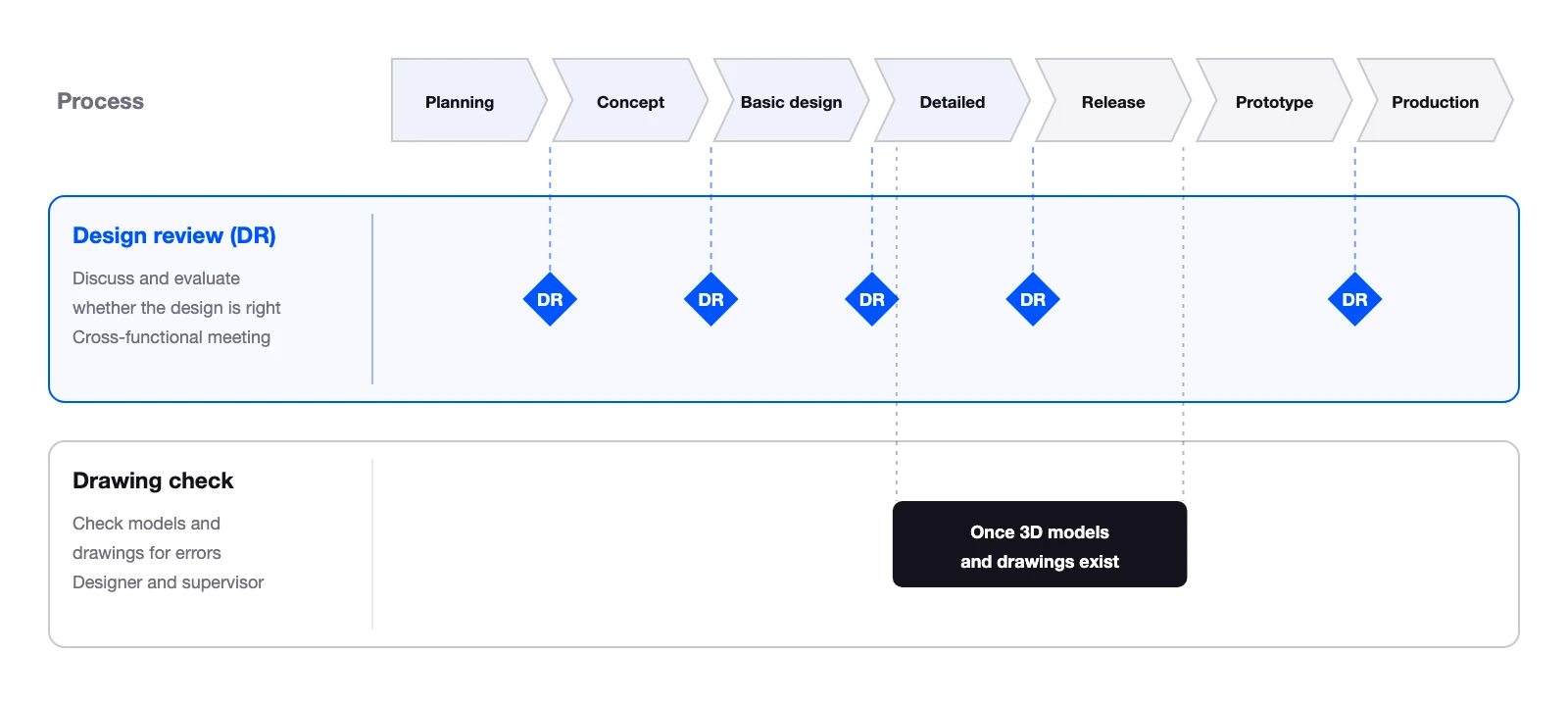
In short, DR confirms that the direction is right, and a drawing check confirms that what has been drawn is right.
What is a design review (DR)?
A design review (DR) is an activity in which the people involved examine, at each stage of design, whether the design at that point is heading toward meeting the requirements. ISO 9001, the international standard for quality management systems, also requires reviews during design and development.
Held at each milestone during design
DR starts before the drawings are finished. At the planning and concept stages, the agenda is how the requirements are interpreted and whether the concept is heading in the right direction. At the basic and detailed design stages, the agenda covers layout, selection of key components, manufacturing methods, cost and quality risks. There are also DRs just before drawing release, and DRs after prototype evaluation that decide whether to move into mass production.
How many stages there are and what each is called varies from company to company. What matters is not the number of stages but having a forum to confirm the direction before going back becomes expensive.
Several departments, each from its own perspective
DR involves not only designers but also the departments that receive the result of the design: production engineering, manufacturing, quality assurance, procurement, sales and so on. The aim is to have each specialist point out early the things a designer is unlikely to notice alone: parts that are hard to make, hard to source, or a poor fit with how the product is actually used.
The format is not limited to formal review boards that pass or fail a design and decide whether it moves to the next stage. Many workplaces also hold informal DRs, where designers gather around a model to talk it through.
DRBFM: focusing on changes
One DR method is DRBFM (Design Review Based on Failure Mode). It focuses on the changes from a proven design and on changes in conditions such as how the product is used, and the people involved list the failures that could result. The idea of concentrating discussion on what has changed, rather than reviewing every item from scratch, is useful for running any DR.
What is a drawing check?
A drawing check is the task of confirming that a finished 3D CAD model or 2D drawing contains no errors, omissions or rule violations. Where DR asks about direction, a drawing check verifies what has been drawn, item by item.
Done once the drawing or model exists
A drawing check looks at design data that has already taken shape. In 3D CAD, interference and ease of machining may be checked at the model stage. On 2D drawings, dimensions and notes are checked before release. Unlike DR, which is held many times during design, drawing checks tend to concentrate just before the drawing release milestone.
Checked by the designer and a supervisor
A drawing check is usually done in two steps: a self-check by the designer, then a check by a supervisor or senior designer. It is not a meeting but a task of working through the drawing one item at a time.
Checking accuracy and whether it can be made
The main items in a drawing check are:
- Dimensions and tolerances: no missing dimensions, no duplicated or conflicting dimensions, tolerance callouts that hold together
- Drafting rules: projection method, line types and symbols follow JIS or in-house rules
- Title block and notes: material, surface treatment, revision history and so on are filled in and correct
- 3D/2D consistency: the 3D CAD model, the 2D drawing and the bill of materials agree
- Machining and assembly feasibility: no shapes that cannot be machined, no interference between parts
The items to check on 2D drawings are covered in detail in 2D Drawing Check List.
Why DR and drawing checks get mixed up
Even if the two can be separated in words, the boundary tends to blur in practice. In conversations with design departments at manufacturers, WOGO often hears about practices like these:
- A “consultation-level drawing check” at the 3D CAD stage: once a unit-level model exists, people take a rough look at whether it can be made and whether anything interferes. It is an in-between session that is hard to call either a DR or a formal drawing check
- A second-stage drawing check that looks at function and cost: after a supervisor’s check fixes the drawing errors, the product lead looks at the whole model and points out function issues and over-built parts. In substance, this is close to a DR evaluation
- Team meetings before release to align on interference and function: in a regular meeting, the team gathers around the model to check interference and assembly. The format is a DR, but what is being checked belongs to a drawing check
Having such sessions is not a problem in itself. Confusion arises when the participants do not share the same idea of what that session is meant to decide. Whether a drawing check is expected only to catch errors in what is written on the drawing, or also to confirm that past failures are not being repeated, changes who is needed and how much time it takes. This is where the mismatches come from: people meet for a DR and the time runs out on pointing out drawing mistakes, or a drawing sent for checking comes back rejected over design direction.
How to make both DR and drawing checks work
Spend DR time on direction, not on drawing details
DR time is limited. If the session fills up with missing dimensions and wrong symbols, it runs out before the important questions are discussed: whether these specifications are right and which risks to accept. When the designer finishes a self-check before the DR and the agenda is narrowed to points that need a decision and risks each department should look at, the discussion turns to direction.
Do not carry “in the first place” questions into the drawing check
If a problem with the concept itself is found at the drawing check just before release, many part drawings have to be redrawn. Ideally, the validity of the concept and layout is confirmed in a DR held once unit-level models exist in 3D CAD. For designs reused from existing ones, focusing the discussion on what was changed from the original reduces gaps even in a short session.
Document drawing check criteria to reduce variation between checkers
If findings change depending on who checks, designers feel the result depends on who they ask. Sharing the items to check as a checklist is the first step. That said, we also hear that a list of generic items is so obvious that hardly any drawing gets caught by it. A checklist works as a drawing check standard only when it includes failures that actually happened at your company and the drawing conventions of your customers.
Feed findings from DR and drawing checks back into the next design
Past failures may be recorded in reports, but because they are not linked to design information, the same findings can come up again in the next design. Findings from DRs and drawing checks should not end with the fix; they should be fed back into checklists and design rules. The drawings you reuse may not have been properly checked either. When reusing a design, do not treat the original drawing as the correct answer.
Automating drawing checks and the human role in DR
Among drawing check items, those that can be judged from geometry and numbers, such as missing dimensions, shapes that cannot be machined and interference between parts, are areas where automated checking by software works well. On the other hand, the judgments handled in DR, such as whether these specifications are really right or which risks to accept, require discussion by people who understand the requirements and circumstances.
The two are not in conflict. Automating the drawing checks that can be judged mechanically reduces the time designers and supervisors spend tracing drawing details by eye. That time can go to discussion and decisions in DR. Preparing for DR, for example by matching against past failure cases or organizing the issues in advance, is also becoming easier to support with digital tools.
How far drawing checks can be automated is covered in detail in What Is AI Drawing Inspection?. WOGO is also working on automated design verification, which automatically detects machinability problems and design rule violations from 3D CAD data.
Frequently asked questions about design reviews (DR) and drawing checks
Which comes first, DR or the drawing check?
DR starts first. DR is held at each design milestone from the concept stage, while a drawing check is done once the 3D CAD model or 2D drawing exists. Just before release the two happen close together; at that point, clearing drawing errors in the drawing check first lets the DR spend its time on direction and remaining risks.
If we do drawing checks, do we still need DR?
Yes. A drawing check confirms whether the drawing or model is accurate. Problems with the validity of the design itself, such as misreading the specifications or taking the concept in the wrong direction, will not be caught by a drawing check even if the drawing is drawn accurately. Conversely, even after DR confirms the direction, missing or conflicting entries on the drawing still need a drawing check.
Does a small design team need DR?
The format can be light, but we recommend having the forum. Simply explaining your thinking at the concept stage to another designer or to someone in manufacturing or procurement, and taking their questions, brings up issues that are hard to notice alone. If your team is too small for formal review boards, adding informal DRs at each milestone is a practical approach.
Who should take part in a DR?
As a rule, people from the departments that receive the result of the design, in addition to the designers. Besides production engineering, manufacturing, quality assurance and procurement, sales or service may join depending on the agenda. However, too many participants make each person’s input shallow, so it is also important to limit attendance to people who can take responsibility for giving an opinion on that session’s agenda.
How does this relate to design verification or a design review in ISO terms?
ISO 9001 separates design and development controls into review, verification and validation. Review is an activity to evaluate whether the results of design can meet the requirements; verification confirms that design outputs meet the input requirements. In this framework, DR corresponds to review, and a drawing check is part of verification.
Summary
Design reviews (DR) and drawing checks are both ways of confirming that a design is right. The difference lies in the question they ask. DR discusses and evaluates “Is this design really the right one in the first place?” with several departments, at each design milestone starting from the concept stage. A drawing check verifies “Does this design or drawing contain any errors or omissions?” with the designer and a supervisor, once the 3D CAD model or 2D drawing exists.
When the two get mixed up, DRs end in nitpicks about drawing details, or problems with direction surface at the drawing check and cause major rework. Dividing the roles so that DR confirms direction and the drawing check confirms accuracy, and feeding the findings from each back into the next design, is the shortest way to make both work.
Drawing check items that can be judged from geometry and numbers are easy to automate, and the time freed up can go to discussion in DR. Start by looking back at what is actually discussed in your company’s DRs, and check whether things that belong in a drawing check have crept in.
If you would like to discuss how to run design reviews and drawing checks, or how to automate drawing checks, you are welcome to contact us.
This article was written by WOGO Inc., a University of Tokyo-originated startup developing systems for design verification, automated drawing inspection and design/drafting automation in manufacturing using 3D, CAD and AI technologies.