



2D Drawings
3D CAD
Knowledge Transfer
Manufacturing DX
October 26, 2026
What Is Drawing Barashi? How to Create Part Drawings from an Assembly, What to Add, and How to Work More Efficiently
 Updated on 2026/10/26
Index
Finishing a design in 3D CAD does not mean the drawings are ready for release. At many workplaces, the next step is “zumen barashi” (drawing breakdown): creating a 2D drawing for each part, one sheet at a time.
Drawing barashi is not simply copying a 3D model onto paper. It means adding information that the 3D model does not show: which surface dimensions start from, where tolerances go, and how surface treatment and heat treatment are specified.
This article explains what drawing barashi means and why it has not disappeared in the age of 3D CAD, then covers the steps for creating part drawings from an assembly, the information to add to part drawings, and ways to make the work more efficient and automate it.
Key points
- Drawing barashi is the work of splitting an assembly drawing (or 3D assembly) into its parts and creating a 2D drawing (part drawing) for each one. It is also called drafting or “making barashi drawings”
- Part drawings are needed to order machining and to keep records in-house. The dimensions, tolerances and treatment instructions needed for manufacturing are still often communicated on 2D drawings
- There is a move to convey instructions in 3D models, such as 3D PMI, but the barrier to switching all at once, including small machine shops among your suppliers, is high
- Besides shape, part drawings need dimensional tolerances, geometric tolerances, surface roughness, surface treatment, heat treatment, welding symbols and more
- Ways to work more efficiently include outsourcing, CAD templates and macros, and automated drafting tools. The drawing work determined by the 3D model can be automated
What is drawing barashi?
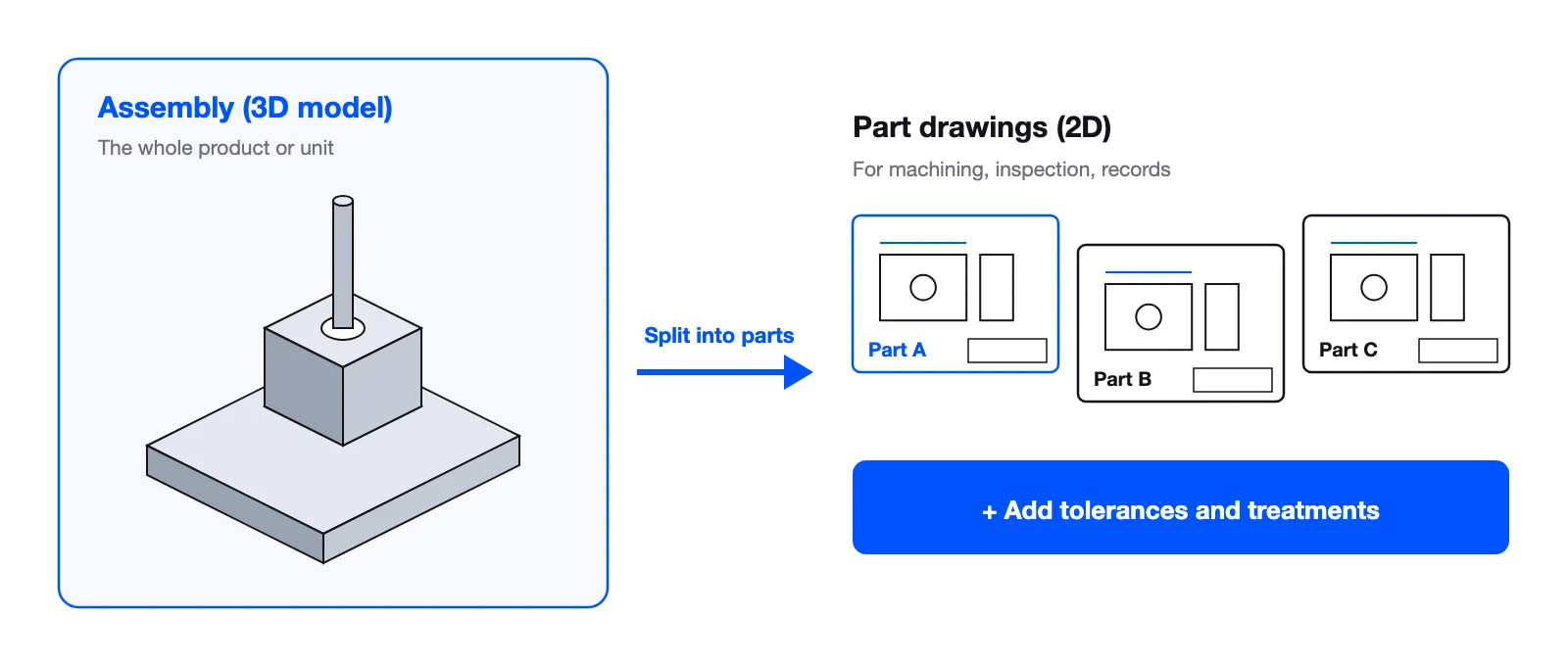
Drawing barashi is the work of splitting the product shown in an assembly drawing into its component parts and creating a manufacturing 2D drawing (part drawing) for each part. On the shop floor it is called “barashi,” “drawing barashi” or simply drafting.
When design was done in 2D CAD, barashi meant reading each part’s shape from the assembly drawing and redrawing it as a part drawing. Today, with design done in 3D CAD, it generally means creating a 2D drawing for each part from the 3D models that make up the assembly.
Assembly drawings, part drawings and barashi drawings
| Drawing | What it shows | Main use |
|---|---|---|
| Assembly drawing | The whole product or unit and how the parts fit together | Assembly instructions, checking the part structure |
| Part drawing | The shape, dimensions, tolerances, material and treatment of a single part | Ordering machining, inspection, records |
| Barashi drawing | A part drawing created by breaking down an assembly drawing (another name for a part drawing) | Same as a part drawing |
Why create part drawings?
If you have a 3D model, why draw 2D drawings? There are two main reasons.
To order machining
When parts are ordered from outside machine shops, quotes and machining instructions are still mostly based on 2D drawings. The machine shop reads the drawing to decide the material, process, equipment and inspection method. Instructions on how to make the part and to what accuracy, such as tolerances and surface treatment, are not conveyed by the shape of a 3D model alone.
To keep a record in-house
A part drawing is also the formal record of how it was decided to make that part. Keeping drawings along with their revision history means they can be used years later for reorders, for investigating failures, and as the basis for receiving inspection.
For both ordering and record-keeping, 2D drawings are still the basis of daily work. In conversations with design departments at manufacturers, WOGO often hears comments such as “the subcontractors who machine our parts work from 2D drawings, and even their NC programs are built from the drawing dimensions” and “quotes, procurement and assigning suppliers all run drawing by drawing.” There is also a gap inside companies: design departments want fewer 2D drawings, while manufacturing and inspection departments ask for them. In engineer-to-order work, meetings with customers are often held by writing directly on 2D drawings.
Why drawing barashi has not disappeared in the age of 3D CAD
The ideas of “3D PMI,” which attaches manufacturing information such as dimensions, tolerances and notes directly to 3D models, and of “3DA models” (3D-only drawings) that use them in place of drawings, are supported by standards and industry guidelines, and some companies have started using them. If no drawings were needed, there would be no barashi work.
However, moving away from 2D drawings all at once faces high barriers.
- Supplier readiness: not every supplier, including small machine shops, is set up to receive 3D data and machine and inspect from it
- Tools and cost: handling 3D manufacturing information requires compatible CAD, viewers or dedicated tools. Suppliers bear the same burden
- In-house operations: inspection criteria, approval and revision control, and drawing storage are built around 2D drawings
On the other hand, step-by-step approaches have begun, such as putting only important dimensions, geometric tolerances and notes in the 3D model and leaving only outline dimensions on the 2D drawing. Even so, placing dimensions on a 3D model where people can read them easily requires the same judgment about presentation as a 2D drawing. Being able to enter the data and producing a readable drawing are two different things.
For now, therefore, designing in 3D and communicating in 2D drawings is likely to continue. The realistic approach is not to eliminate drawing barashi but to find ways to do it efficiently and accurately.
Steps for creating part drawings from an assembly
Drawing barashi generally proceeds as follows.
- List the parts: from the assembly’s bill of materials, decide which parts need drawings. Exclude purchased and standard parts and assign part numbers
- Choose the views: choose as the front view the face that shows the machining direction and shape features, and add the necessary projections, sections and detail views
- Add dimensions: dimension from the faces and holes used as references for machining and measurement, placing them so nothing is missing or duplicated
- Add tolerances and surface instructions: specify dimensional and geometric tolerances where fits or positional accuracy are needed, and surface roughness where a surface finish is needed
- Fill in notes and the title block: enter notes on material, surface treatment, heat treatment and general tolerances, and the title block with part number, scale and revision history
- Self-check and drawing check: confirm consistency with the 3D model and assembly drawing, and release after a drawing check
Steps 2 to 5 are where design intent, such as which surface is the reference and how much accuracy is required, is put onto the drawing. Even for the same shape, the way dimensions are added differs between designers and companies.
Information to add to a part drawing
Projections created from a 3D model are not enough for a part drawing. You add the information needed for machining and inspection.
| Information | What it specifies | Where to enter it / notes |
|---|---|---|
| Dimensional tolerance | The allowed range of a dimension (e.g. holes and shafts at fits) | Give individual tolerances only where accuracy is needed; cover the rest with general tolerances |
| Geometric tolerance | Allowed deviation of form and position, such as flatness, perpendicularity and position | Specify together with the reference (datum) |
| Surface roughness | The degree of surface finish | Focus on functional surfaces such as sliding and sealing surfaces |
| Surface treatment | Plating, painting, anodizing and so on | State the type and extent, and whether dimensions are before or after treatment |
| Heat treatment | Hardening, tempering and so on, with hardness | Specify the area to be treated and the target hardness |
| Welding symbol | Type, position and size of welds | Needed for fabricated and welded structures. Weld beads are often not shown in the 3D model |
| Material and general notes | Material, treatment of unspecified corners, general tolerance grade and so on | Collect in the title block or notes area |
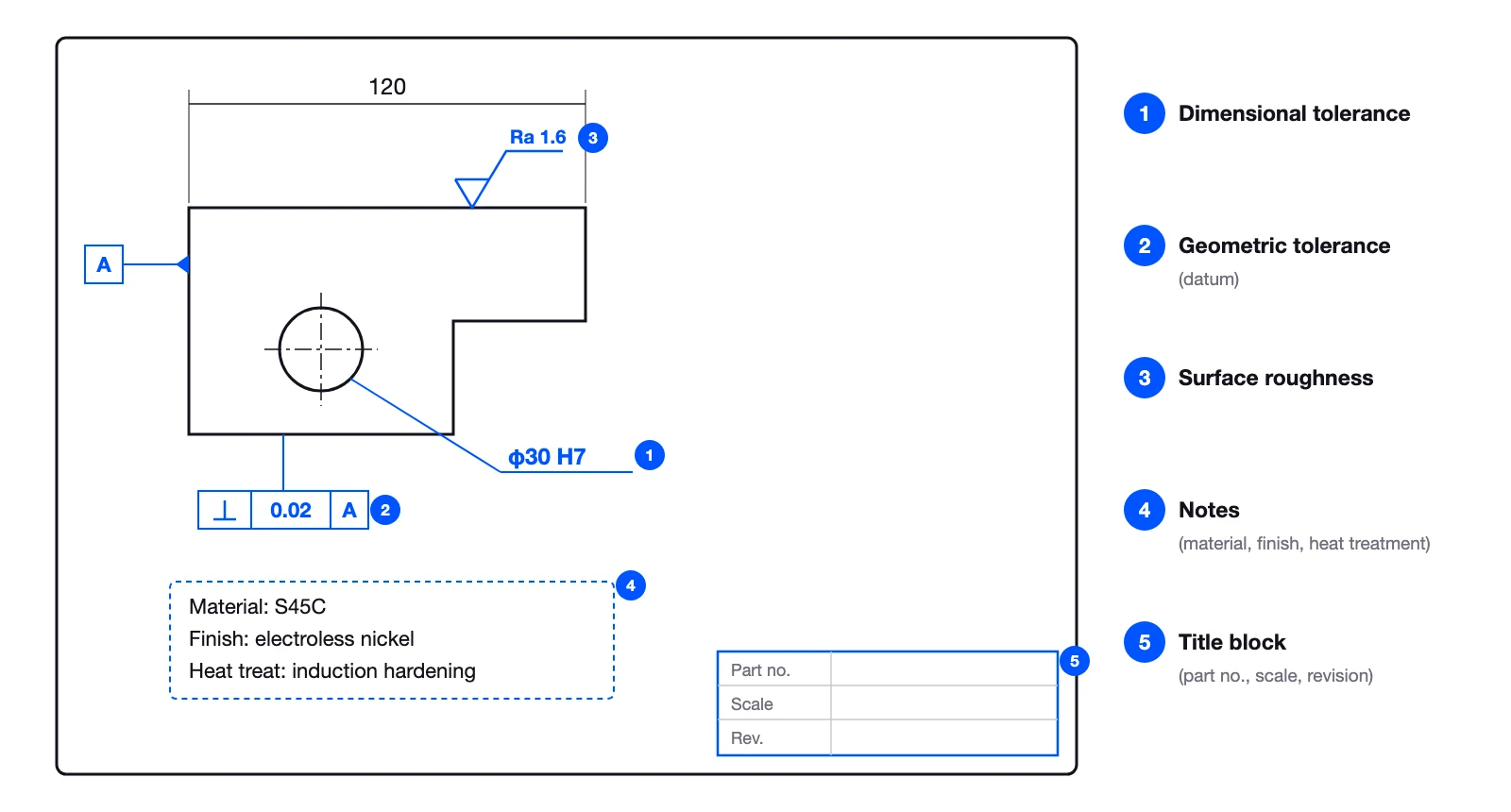
Most of this information is not determined by the shape of the 3D model. Where accuracy is needed and which surfaces affect function are judged by the designer who knows how the part is used in the assembly. This is why drawing barashi requires design knowledge.
General dimensions such as the outline are determined mechanically by the shape, but functional dimensions, fit tolerances and geometric tolerances cannot be decided from the part drawing alone. They have to be decided by laying the assembly drawing next to the part drawing and looking at how the part meets its mating parts. Design departments also tell us that “the value of a part drawing lies in these functional dimensions and tolerances.”
The “right” reference for dimensions also differs from company to company. For the same sheet metal hole, some companies dimension from an edge, some from a bend and some from a center line. Many JIS provisions only say what is preferable, leaving room for choice. There are also drawing layouts that are easier for the machining side to read, such as drawing turned shaft parts horizontally. Whether in-house rules are written down determines the quality of barashi.
Common entry errors include missing dimensions, duplicated dimensions, duplicated or misplaced balloon numbers, wrong surface treatment instructions, missing material or fastening instructions, and notes that violate in-house rules. The check points are set out in 2D Drawing Check List.
How to make drawing barashi more efficient
Drawing barashi occurs for every part, so the work tends to pile up before release. Ways to make it more efficient include the following.
Outsource it
When the number of drawings fluctuates, outsourcing absorbs the volume. Many companies divide the work so that engineers focus on design and barashi is outsourced. However, writing instructions, checking the drawings you receive and going back and forth on corrections remain in-house. We also hear that drawing styles vary from one outsourcing partner to another.
Use CAD templates, macros and automatic dimensioning
Making templates for the drawing frame, title block and common notes reduces both effort and omissions. For products with fixed shapes and configurations, repeated output with macros or Excel links is also possible. CAD software has automatic dimensioning, but we often hear that it is faster to add dimensions yourself from the start, because dimensions go missing or the layout is not well balanced for the sheet. Reproducing each company’s way of dimensioning is difficult in practice.
Use automated drafting tools
Some tools read the 3D model and automatically generate the view layout, dimensions, tolerances, notes and title block. Because they produce drawings with the same mechanism even when shapes change, they also work for high-mix design.
Design departments often tell us things like “it would help to have someone who just draws the drawings” and “it doesn’t have to be perfect; if half is drawn automatically, that’s enough.” The expectation is a division of work in which AI or automated drafting produces the draft and people check and finish it. The prerequisite is that drawings follow the company’s own drafting rules and the drawing layout the machining side expects.
There are also concerns. Young designers have learned design by drawing simple part drawings. If they have fewer chances to draw, will people stop developing? Even when automating, it is important to keep opportunities to read the generated drawings and understand why those dimensions and tolerances were chosen.
What remains for people when drawing barashi is automated
What can be automated is the drawing work determined by the 3D model. Design intent, such as which face to show as the reference, which dimensions to use for inspection and where to put tolerances, is assumed to be given by people. Drawing barashi does not disappear; automation takes over the manual parts so designers can spend their time on judgment.
WOGO’s Hacadly Automated 2D Drafting automatically creates 2D drawings with views, dimensions, tolerances, notes and a title block from a 3D model and supplementary information. With design intent such as reference faces and datums given, it can output drawings that follow each company’s drafting rules. The overall picture of creating drawings automatically from 3D models is covered in How to Create Drawings Automatically with AI.
Frequently asked questions about drawing barashi
Are barashi drawings and part drawings the same thing?
They refer to almost the same thing. On the shop floor, a part drawing created by breaking down an assembly drawing is sometimes called a barashi drawing. As a formal drawing type, it is a part drawing.
Who does drawing barashi?
At many companies the designer does it, while others assign it to dedicated drafters or young designers, or outsource it. Because the tolerances and treatment instructions added to part drawings require an understanding of design intent, instructions and checks by the designer are essential even when the work is outsourced or shared.
Does 3D PMI make drawing barashi unnecessary?
Putting manufacturing information in the 3D model can reduce the work of drawing 2D drawings. However, it assumes that suppliers can receive that data and machine and inspect from it. In-house inspection and record-keeping also need to change, so most workplaces continue to use 2D drawings alongside it.
Can we draw part drawings with general tolerances only?
Dimensions that do not need accuracy can be specified with general tolerances. However, fits and places that need positional accuracy require individual dimensional or geometric tolerances. Relying on general tolerances for everything means either the required accuracy is not achieved, or the whole part is made too tight and machining costs rise.
How do we decide whether to outsource or automate drawing barashi?
Outsourcing suits absorbing fluctuations in volume, and automation suits producing drawings to the same standard consistently. A realistic approach is to combine them: bring routine parts that are easy to turn into rules back in-house through automation, and outsource parts with unusual shapes or sudden spikes in volume.
Summary
Drawing barashi is the work of splitting an assembly drawing into parts and creating 2D part drawings used for machining and records. Despite moves such as 3D PMI, considering suppliers and in-house operations, 2D drawings are unlikely to disappear for some time.
Besides shape and dimensions, part drawings need information such as dimensional tolerances, geometric tolerances, surface roughness, surface treatment, heat treatment and welding symbols. Because this involves the designer’s judgment, barashi takes time.
There are many ways to work more efficiently, including outsourcing, CAD templates and macros, and automated drafting tools. Consider a division of work in which the drawing work determined by the 3D model is automated and designers spend their time on judgments such as references and accuracy.
If you would like to discuss making drawing barashi more efficient or automated drafting, you are welcome to contact us.
This article was written by WOGO Inc., a University of Tokyo-originated startup developing systems for design verification, automated drawing inspection and design/drafting automation in manufacturing using 3D, CAD and AI technologies.